Category: Earning Money Online

  • Ai Prompts for Content Creation

    AI & Content Creation

    AI Prompts for Content Creation: A 10-Minute Daily Routine for Busy Parents

    This post contains affiliate links. If you buy through them, I may earn a commission at no extra cost to you. I only recommend tools I’d share with someone I was working with directly.

    If you’re a parent building an online income, you already know the hardest part isn’t the idea. It’s the time. You sit down during naptime or after bedtime, and the blog post, the captions, the video script and the email all compete for the same 30 minutes.

    You started this to get more time with your kids, not less: the unscheduled hugs, the spontaneous afternoon at the park, simply being there. But content creation can quietly turn into a second full-time job, and before long you’ve traded one grind for another.

    The fix isn’t working harder. It’s learning to write better AI prompts for content creation. In this guide you’ll get a simple 4-part prompt formula, three copy-and-paste prompts, and a routine that gets your content for the day done in about 10 minutes, once your prompts are set up.

    AI isn’t here to replace your voice, your creativity or your story. Think of it as an assistant that handles the first draft, so you can spend your energy on the part only you can add.

    My story

    I’ll be honest: for a long time, I believed social media and AI would take forever to learn. I’d sit down with my laptop, stare at a blank screen and have no idea where to start.

    When I finally tried, it didn’t go smoothly. It took me days to get a prompt that actually worked for me, and days more to set up a plan for my social media and my digital products. And those products? I made a few that never went online, simply because I didn’t believe they were perfect yet.

    Everything changed when I stopped asking AI questions and started giving it direction. Once I told it who to be and gave it a clear task first, the drafts finally sounded like me, and I had something I was ready to share.

    Sound familiar? If you have an idea, or even a finished product, that never went online because it didn’t feel perfect yet, that’s exactly why I created Package Your Knowledge. It helps you find your angle, shape it into a real product and sketch the simplest way to sell it, all in under an hour.

    Those days of trial and error are exactly what I want to save you from. Here’s the shortcut I wish I’d had.

    Stop Searching, Start Delegating: The Secret to Better AI Results

    The biggest mistake most people make with tools like ChatGPT or Claude is treating them like Google. They type short, vague requests such as:

    • “Write a blog post about online income for moms.”
    • “Give me 5 Instagram ideas.”

    The result? Generic text that sounds like a textbook and doesn’t connect with real people.

    To make AI work for you, shift from asking questions to delegating tasks. Imagine hiring a brilliant assistant. If you just said “Write a newsletter,” they’d have a dozen questions: Who is it for? What tone should I use? What is the goal?

    AI works the same way. Give it context, limits and a clear role, and your first draft gets much better. Here’s what that difference looks like:
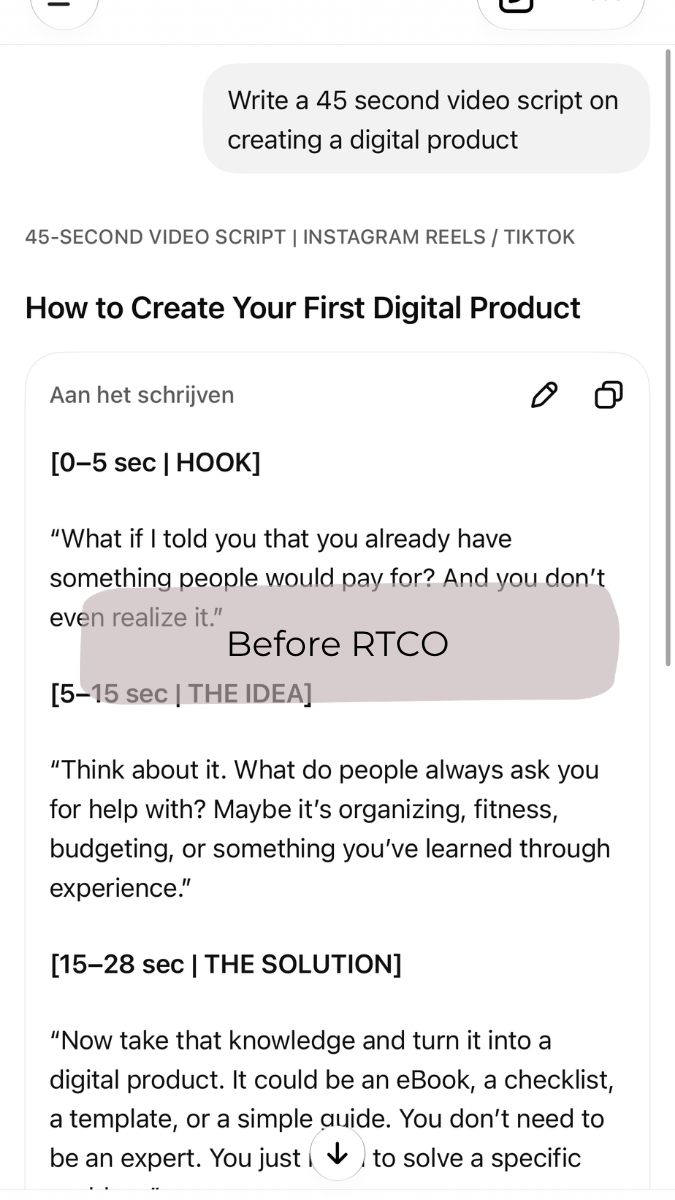
    Before: a short, vague AI prompt that gives generic, textbook-style content
    BeforeA short, vague request: generic text that could have been written by anyone.
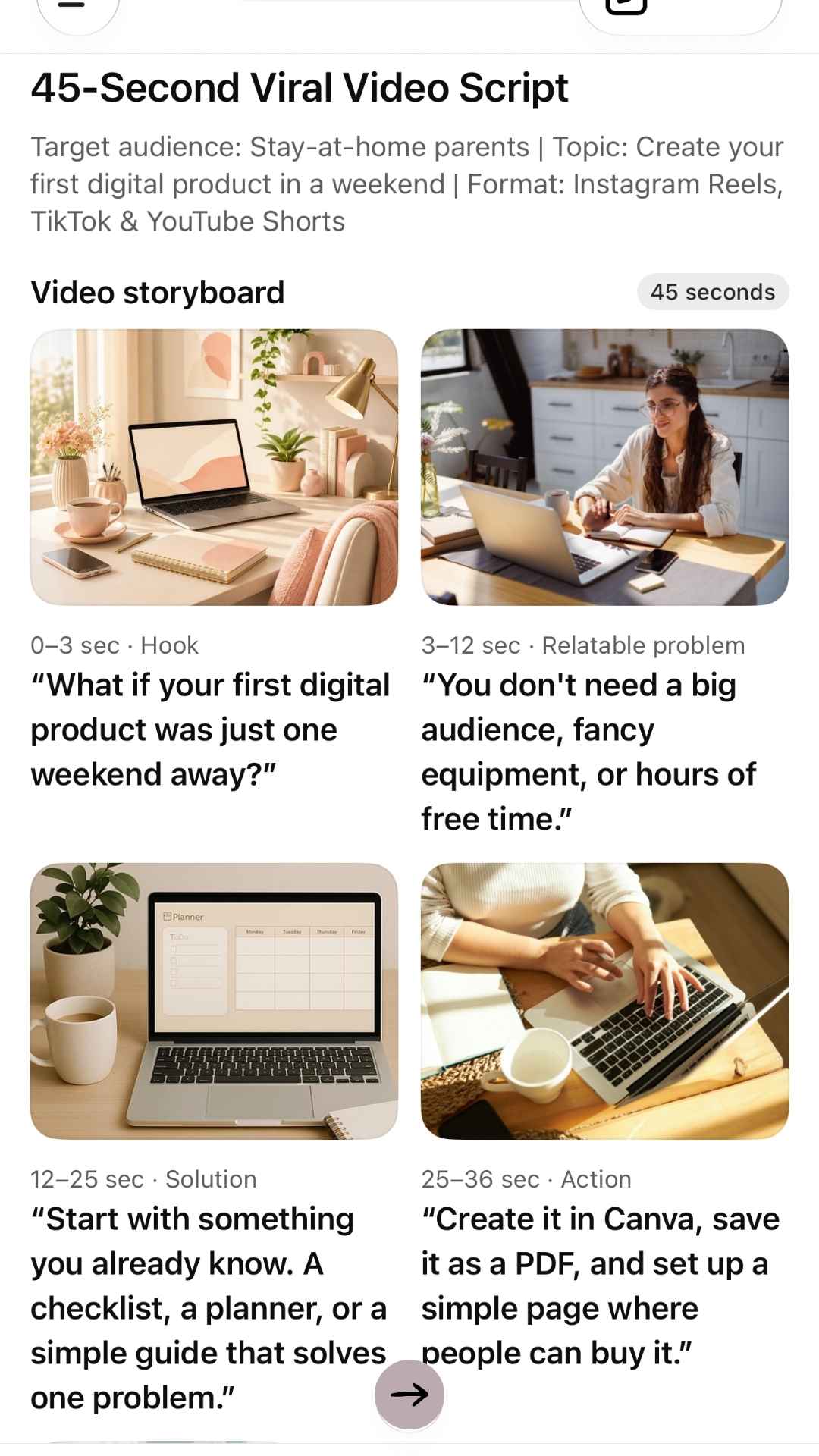
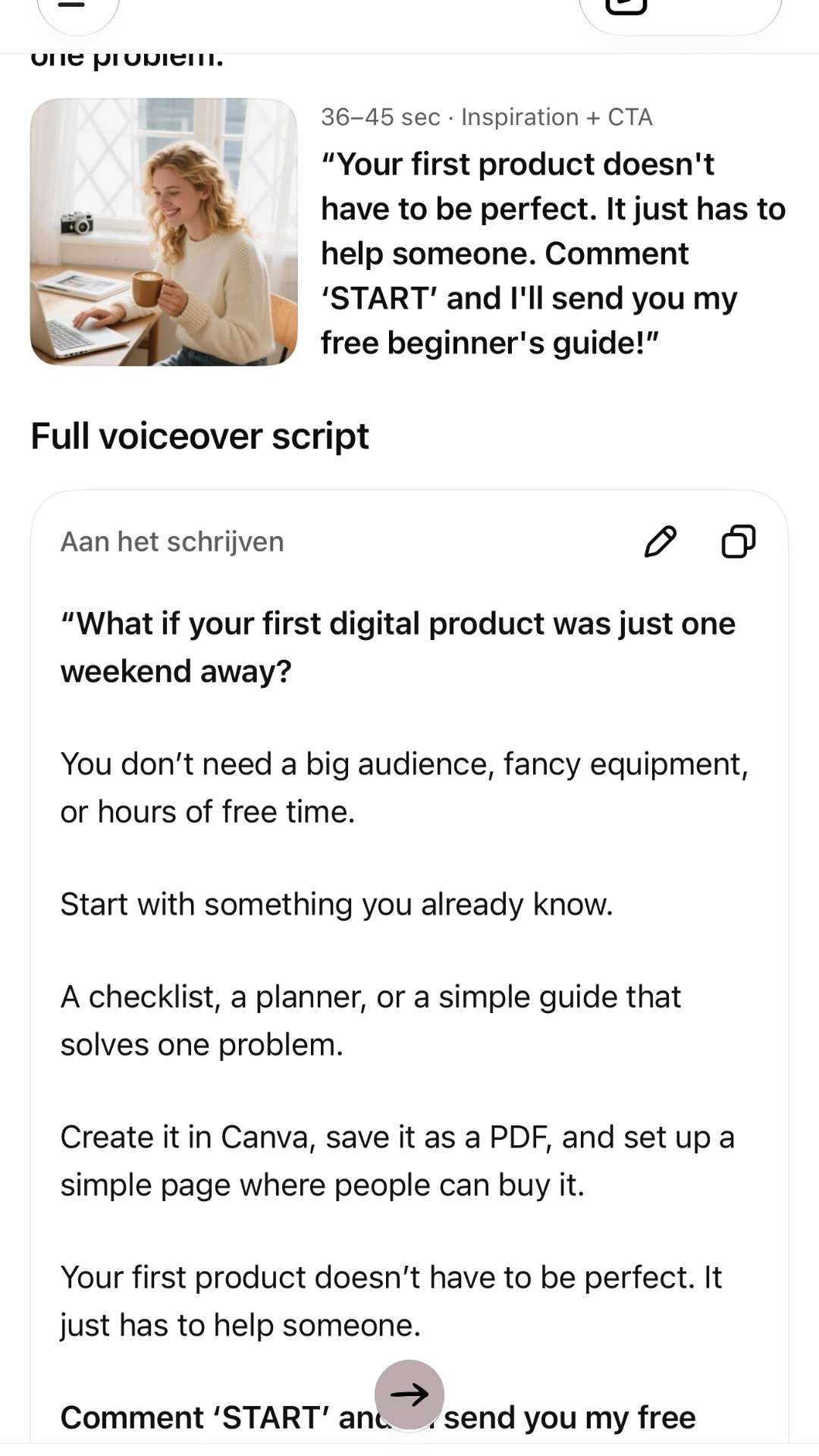
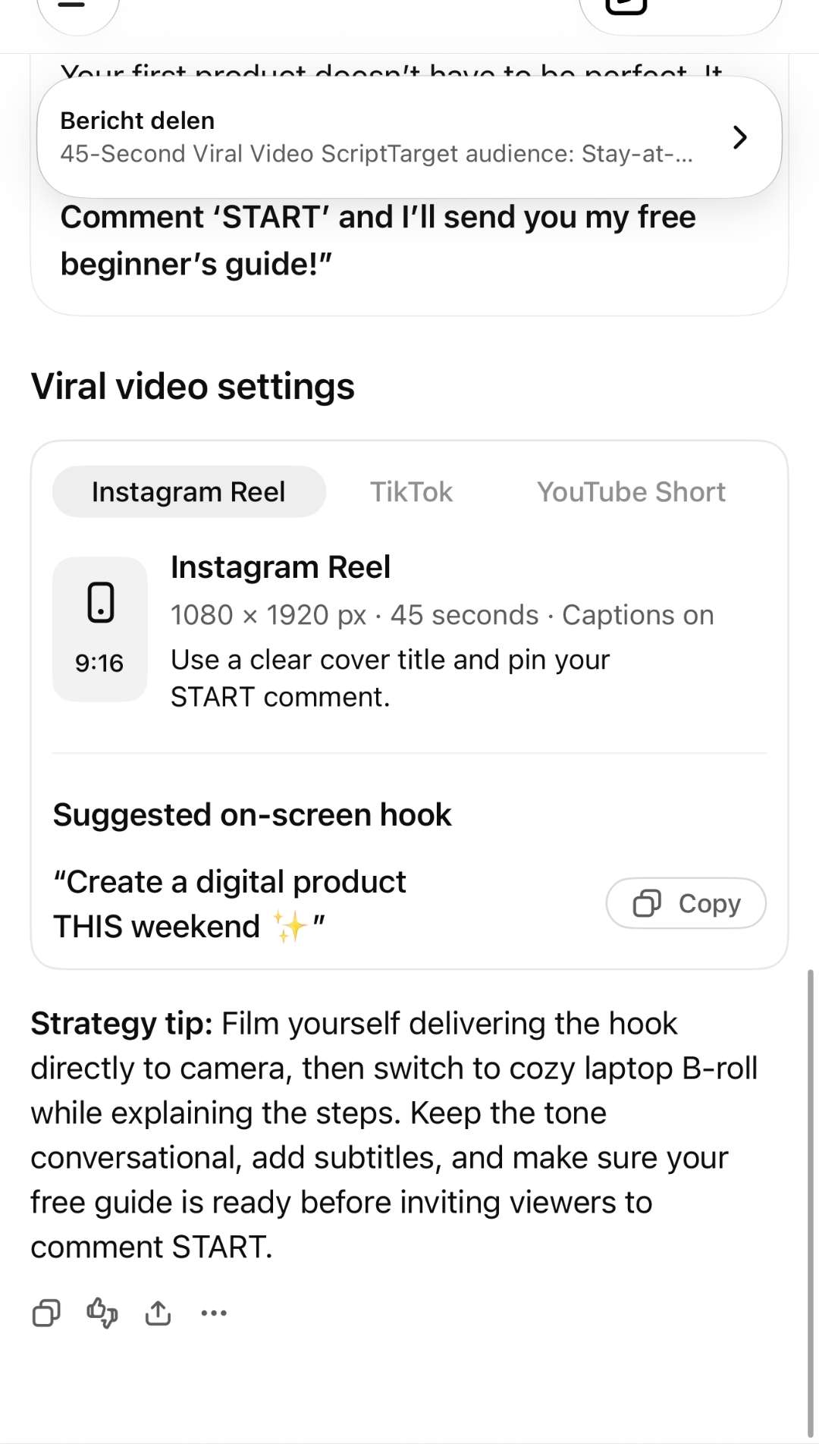
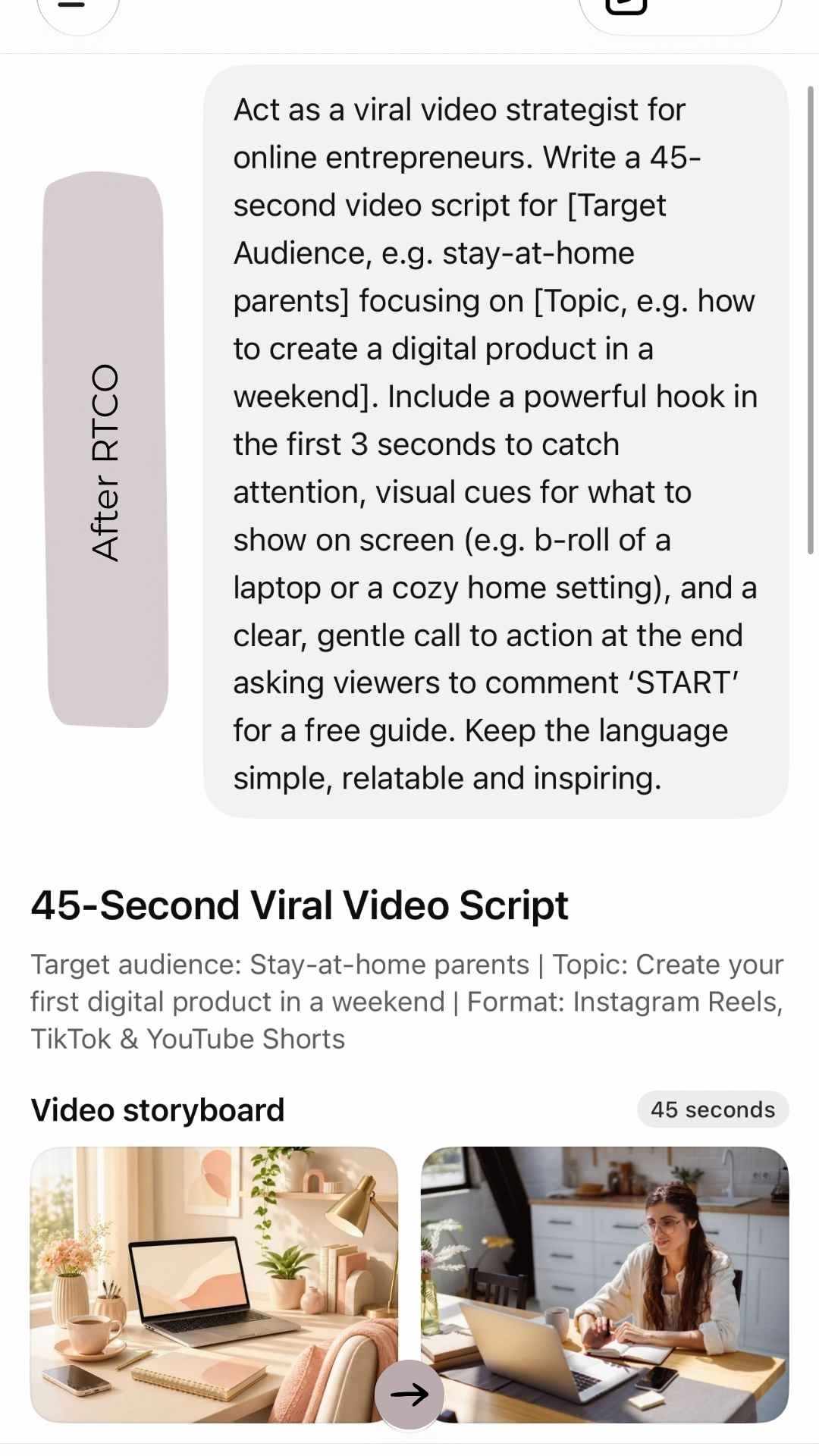
    After 1 of 4: a full R.T.C.O. prompt in ChatGPT with a clear role, task, audience and call to action for a 45-second video script After 2 of 4: the AI's video storyboard with scene-by-scene visuals and on-screen text for busy parents After 3 of 4: the full voiceover script, warm and personal, with a gentle call to action After 4 of 4: ready-to-use Instagram Reel settings with an on-screen hook and a strategy tip
    AfterThe same request with a clear role, task and audience: a full script, storyboard and posting plan, ready to personalize. Swipe to see all 4 →

    The 4-Part Formula for Prompts That Sound Like You (R.T.C.O.)

    To get human-sounding results on the first try, build every prompt from these four parts:

    R

    Role

    Tell the AI who it needs to be.

    “Act as a direct-response copywriter and supportive online mentor for busy parents.”

    T

    Task

    State exactly what you want created.

    “Write three engaging short-form video scripts about time management.”

    C

    Context & Audience

    Explain who the content is for and what problem it solves.

    “The audience is parents who want to earn an income online so they can stay home with their children.”

    O

    Outcome & Constraints

    Define the tone, length, format and what to avoid.

    “Keep the tone warm, encouraging and actionable. Avoid corporate jargon. Keep each script under 60 seconds.”

    Structured this way, your prompt closes the gap between generic AI text and content that actually sounds like you.

    3 Copy-and-Paste Prompts for Your 10-Minute Work Window

    These three prompts are written for creators balancing business and family life. Copy them, fill in the [brackets], and save them somewhere you can find them again (a note on your phone works fine). Saving them once is what makes the 10-minute routine possible.

    1. The Faceless Video Script Generator

    Want to show up on Instagram Reels, YouTube Shorts or TikTok without being on camera? This prompt gives you the hook, the script and the visual cues in one go. New to faceless video? Read How to Create Scroll-Stopping Videos Without Filming a Single Clip first.

    Prompt

    Act as a viral video strategist for online entrepreneurs. Write a 45-second video script for [Target Audience, e.g. stay-at-home parents] focusing on [Topic, e.g. how to create a digital product in a weekend]. Include a powerful hook in the first 3 seconds to catch attention, visual cues for what to show on screen (e.g. b-roll of a laptop or a cozy home setting), and a clear, gentle call to action at the end asking viewers to comment ‘START’ for a free guide. Keep the language simple, relatable and inspiring.

    Once your script is ready, you can turn it into a studio-quality AI video without ever picking up a camera. For this step I recommend this AI video tool (affiliate link): type your script and it builds the video for you, with voice, visuals and captions. Still looking for a product to talk about? Get ideas from 5 types of digital products you can create.

    2. The Blog Post Outline & Draft Engine

    Instead of staring at a blank page, use this prompt to get a complete first draft that you then personalize with your own stories.

    Prompt

    Act as an expert content writer for an online business blog aimed at parents seeking financial freedom. Outline and write a comprehensive blog post titled ‘[Insert Your Working Title]’. Break the article into clear sections with descriptive H2 headings. For each section, provide practical, step-by-step advice. Write in an approachable, encouraging voice, as if speaking to a friend over coffee. Include a brief concluding paragraph with a call to action.

    Clear H2 headings help readers skim, and they help Google understand your post too. Learn more in SEO Made Simple: How to Get Found Online.

    3. The Multi-Platform Content Repurposer

    Don’t create content from scratch for every platform. Take one piece (a blog post, a video script or a product description) and let AI adapt it for everywhere else.

    Prompt

    I am going to paste a piece of content below. Read it carefully and repurpose it into: 1) one engaging email newsletter with a catchy subject line, 2) two short Instagram captions with bullet points, 3) one Pinterest pin title and description, and 4) three quick text post ideas. Keep a personal, encouraging tone suited to busy parents building an online income.

    [PASTE YOUR CONTENT HERE]

    Not sure which platform deserves your limited time? I compare Instagram (warm sales) and Pinterest (cold sales) in How to Build & Sell Your First Digital Product.

    The 10-Minute Routine: From Prompt to Published

    Here’s what a typical day looks like once your prompts are saved:

    Min 1–2

    Open your saved prompt, fill in today’s topic and paste it into your AI tool.

    Min 3–7

    Read the draft and make it yours. Change about 15–20% of the words: add a real family moment or your own opinion, and check any facts or numbers.

    Min 8–10

    Copy the finished text into your scheduler, newsletter platform or video tool.

    Be realistic about your first week. Setting up and fine-tuning your prompts takes longer the first few times, so plan one longer naptime session to get them right. After that, 10 minutes a day is enough for a social post, an email or a short video script.

    Then you close the laptop and spend the rest of the day with your children, knowing your business is still moving forward.

    Frequently Asked Questions

    Is it okay to use AI-written content on my blog?

    Yes. Google looks at whether content is helpful and original, not at how it was written. Just don’t publish the raw draft: add your own experience, check the facts, and make sure it really answers your reader’s question.

    Which AI tool should I start with?

    ChatGPT and Claude both have free versions that work well with these prompts. Pick one and stick with it for a few weeks. Your prompts matter more than the tool.

    How do I make AI content sound like me?

    Use the R.T.C.O. formula, describe your tone in the Outcome & Constraints part, and always add one personal detail before you publish. You can also paste in a few paragraphs you wrote yourself and ask the AI to match that style.

    How long does this really take?

    Plan one longer session at the start to set up and test your prompts. After that, about 10 minutes a day for a social post, email or short script. A long blog post takes a little more time to personalize, but far less than writing it from scratch.

    Reclaim Your Time, Reclaim Your Life

    Building an online income was never supposed to mean 12 hours a day at a laptop. It was supposed to give you options, freedom, and time with the people you love most.

    With well-written AI prompts, you don’t have to choose between growing your business and being present at home. Let AI handle the first draft, so you spend less time creating content and more time creating memories.

    Digital Guide · $27

    Ready to turn what you know into something you can sell?

    These prompts help you talk about your business in 10 minutes a day, but first you need something worth talking about. Package Your Knowledge is my short, no-fluff guide that helps you find your angle, shape it into a real digital product and sketch the simplest way to sell it, all in under an hour.

    Get Package Your Knowledge — $27

    Instant PDF download · Start in the next 5 minutes

    Ready for the full system? The Internet Millionaire training I recommend (affiliate link) is a step-by-step home-study course that shows you what to create, how to set up a storefront that sells for you, and how to get your offer in front of buyers.

  • How to Sell Digital Products for Scalable Passive Income 2026

    Blog · Digital products

    How to Sell Digital Products for Scalable Passive Income 2026

    Welcome back to Time With Sita! If you’ve been feeling the itch to build something of your own, take control of your schedule, or simply create an extra cushion in your monthly budget, you’re in the right place.

    We often talk about balancing our busy lives with personal growth and financial freedom. Among all the ways to earn secondary income today, one business model stands head and shoulders above the rest: creating and selling digital products.

    Unlike traditional side jobs that exchange your hours directly for money, digital products allow you to create an asset once and sell it endlessly. Let’s break down why side hustles work, explore the wide variety of digital products you can build, and walk through a step-by-step roadmap to launch your own.


    Why a Digital Side Hustle Works

    A side hustle isn’t just about extra cash; it’s about autonomy. However, traditional side gigs—like rideshare driving, freelancing, or tutoring—have a natural ceiling: you only have so many hours in a week.

    Digital products change the dynamic entirely because of three core mechanics:

    • Zero Inventory & Low Overhead: You don’t need a warehouse, shipping labels, or physical materials. Your initial overhead costs are essentially zero beyond your time and basic software tools.
    • Infinite Scalability: Selling 10 copies of a digital guide takes the exact same amount of fulfillment effort as selling 10,000 copies.
    • Passive Delivery: Automated storefronts handle payment processing and file delivery instantly, allowing you to earn money even while sleeping or spending time with family.

    5 Types of Digital Products You Can Create

    You don’t need a master’s degree in software engineering or graphic design to launch a successful product. Here are five popular digital formats categorized by what you might enjoy creating:

    1. Downloadable Templates & Worksheets

    People pay for convenience and efficiency. If you’ve organized your life or workflow using tools like Canva, Notion, or Excel, those exact systems can become products.

    • Examples: Budget trackers, meal planners, social media content calendars, or habit trackers.
    • Why it works: Customers save dozens of hours spent designing systems from scratch.

    2. Educational E-books & Mini-Guides

    Do you have specialized knowledge in a hobby, career path, or wellness topic? A comprehensive 20-to-50-page e-book offers a digestible way for readers to learn from your experience.

    • Examples: “A Beginner’s Guide to Container Gardening,” “Meal Prep Basics for Busy Parents,” or “How to Ace Tech Interviews.”
    • Why it works: E-books target readers who prefer structured, focused insights over endless, scattered Google searches.

    3. Design Assets & Digital Printables

    If you enjoy design, crafting visual assets opens up a massive market on platforms like Etsy and Shopify.

    • Examples: Wall art printables, digital planner stickers, wedding invitation templates, Lightroom photo presets, or logo kits.
    • Why it works: Visual assets serve both consumers decorating their spaces and small business owners looking for accessible branding materials.

    4. Audio & Media Kits

    Visual content gets a lot of attention, but audio assets are equally high in demand for content creators, podcasters, and video editors.

    • Examples: Royalty-free intro beats, meditation audio tracks, sound effects libraries, or video LUTs (color grading files).
    • Why it works: Creators constantly need background assets to polish their media productions without incurring licensing fees.

    5. Mini-Courses & Masterclasses

    If a topic requires step-by-step guidance, video or audio lessons provide deep value.

    • Examples: A 5-part video series on basic watercolor techniques, a productivity masterclass, or an introduction to freelance copywriting.
    • Why it works: Educational courses command higher price points because students receive direct instruction and structured learning paths.

    Step-by-Step Roadmap to Launching Your First Digital Product

    Launching a side hustle can feel daunting if you try to tackle everything at once. Breaking the process into smaller, manageable phases keeps momentum high and prevents overwhelm.

    1. Identify Your Niche & Validate Demand: Focus on solving a real, recurring problem.

      Start by listing your unique skills, routines, or topics friends frequently ask you about. Search platforms like Etsy, Amazon, and Pinterest to see what similar products already exist. Existing competition is actually a positive sign—it proves customers are actively spending money in that category.

    2. Outline & Build Your Minimum Viable Product (MVP): Keep version 1 simple and actionable.

      Avoid spending months perfecting your first release. Focus on creating a clean, high-utility product. Use accessible design tools like Canva (for PDFs, planners, and templates), Notion (for dashboards), or Google Docs/Sheets (for trackers and templates).

    3. Set Up Your Digital Storefront: Select an automated platform for payments and file delivery.

      Choose a user-friendly platform based on your technical comfort level:

      • Etsy: Ideal for built-in marketplace traffic (great for printables, templates, and crafts).
      • Gumroad / Stan Store: Simple, low-friction setups designed for link-in-bio sales and standalone digital files.
      • Shopify: Best for building an independent brand storefront with deep customization options.
    4. Promote and Drive Targeted Traffic: Leverage organic content to showcase value.

      Creating the product is only half the battle. Show your target audience how the product works in real life:

      • Create short screen-recording videos on TikTok, Instagram Reels, or YouTube Shorts showing the product in action.
      • Write blog posts answering common questions related to your product topic.
      • Offer a free mini-checklist or sample page to build an email subscriber list.

    Key Principles for Long-Term Success

    1. Focus on Function Over Flash: A visually stunning planner that is confusing to use won’t get positive reviews. Prioritize clarity and usability above all else.
    2. Listen to Early Feedback: Pay close attention to early buyer questions and reviews. Use their input to refine your product, fix bugs, or inspire your next offer.
    3. Be Patient with the Process: Digital assets build compound returns over time. A single product might only make a few sales in its first month, but as your audience grows and your product catalog expands, those streams accumulate significantly.

    Your next step

    Ready to Turn What You Know Into Income?

    You don’t need a fancy degree, a huge tech team, or months of endless planning to get started. You just need to see the value in what you already know.

    If you’re ready to stop second-guessing your ideas and build a system that actually works, take the first step today:

    • Grab Package Your Knowledge: A short, no-fluff guide designed to help you find your angle, shape your expertise into a real digital product, and sketch the simplest way to sell it—all in under an hour for just $27.

      Get the Guide — $27
    • Explore the Full System: Once you have your product angle locked down, check out the complete step-by-step systems at timewithsita.com to build out your storefront, drive traffic, and scale your online income.

      See the tools I recommend →

    What digital product idea are you most excited to explore? Drop a comment below or reach out to us here at Time With Sita!

  • How to Build & Sell Your First Digital Product to Earn Money Online

    Blog · Side hustle for moms

    How to Build & Sell Your First Digital Product to Earn Money Online (Even with a Naptime Schedule)

    If you’re a stay-at-home mom staring at your laptop screen during a rare 30-minute naptime, wondering how to earn a meaningful income online without sacrificing your presence at home, I want to tell you something directly: you already have what it takes to start.

    I remember sitting at my own desk, feeling completely overwhelmed by the noisy world of online business. I spent countless hours searching for what to make, stressing over how to build it, and feeling entirely lost on how to actually put it out into the world. It seemed like everyone online was an “expert” with fancy tech teams and endless budgets.

    What I eventually realized—and what inspired me to create my digital product, Package Your Knowledge—is that you don’t need a fancy degree, a huge following, or a groundbreaking innovation. You just need your lived experience.


    Why Your Experience as a Mom is Your Most Valuable Asset

    Every single day, you solve complex problems. Maybe you mastered toddler meal planning on a tight budget, figured out how to soothe a baby with colic, developed a budget-tracking spreadsheet that actually works, or organized a homeschooling rhythm that keeps sanity in the household.

    To you, these routines feel ordinary because you live them. But to another mother who is currently drowning in the middle of that exact same struggle, your solution is a lifeline.

    My mission with Package Your Knowledge is simple: to empower everyone—especially moms looking for a flexible side hustle—to take their everyday struggles and shortcuts and turn them into simple digital products. When we share our practical solutions, we build a community where everyone can help each other succeed while earning extra income from home. Your past struggle can become someone else’s shortcut.


    Step 1: Simple Tools for Sales (Stripe & One-Page Platforms)

    The technical side of selling online is usually where most moms freeze up. The good news? You do not need to build a complex 100-page website. You only need two core tools to take orders during naptime:

    1. A Merchant Payment Processor (Stripe): Stripe handles the secure payment processing. When a customer enters their credit card details, Stripe processes the payment and transfers the funds safely into your bank account. Setting it up takes just a few minutes.
    2. A One-Page Storefront Platform: Platforms like Stan Store, Gumroad, Payhip, or ConvertKit integrate directly with Stripe. They allow you to host your digital PDF guide, checklist, or template pack and give you a simple checkout link.

    Your entire storefront only needs three main components: a clear headline stating who it’s for, a 2-3 sentence description of the solution, and a buy button.


    Step 2: Marketing Your Product – Warm Sales vs. Cold Sales

    Once your single page is live, you need to get eyes on it. For work-at-home moms with limited time, there are two primary channels to generate sales: Warm Sales (Instagram) and Cold Sales (Pinterest). Both have distinct advantages and drawbacks depending on how much time you have available.

    1. Warm Sales via Instagram

    Warm sales happen when you sell to an audience that already knows, likes, and trusts you. Instagram is built for personal connection, stories, and community building.

    • The Benefits: Higher conversion rates. Because your followers see your daily life, your reels, and your honest stories, they trust your recommendations. Sales happen faster because the trust foundation is already built.
    • The Negatives: It requires real-time presence. You need to post consistently, respond to DMs, create video content, and stay active. For busy moms with unpredictable days, the constant content treadmill can feel exhausting.

    2. Cold Sales via Pinterest

    Cold sales happen when you sell to people who have never heard of you before. Unlike Instagram, Pinterest is not a social network—it is a visual search engine where people actively search for solutions (e.g., “how to meal plan for toddlers” or “budgeting printables for families”).

    • The Benefits: Truly passive, evergreen traffic. A single Pin created today can continue driving interested buyers to your product page months or even years down the road without you needing to show your face or respond to messages daily.
    • The Negatives: Lower initial conversion rate and slower build-up. Cold audiences take longer to buy because they don’t know you yet. Your product page must clearly articulate the value instantly to convert a complete stranger into a paying buyer.

    Start Small: One Problem, One Solution

    If you are balancing baby naps, school pickups, or household demands, don’t try to build a massive 200-page course. Keep it small on purpose. Create a 5-page PDF guide, a simple printable checklist, or a practical worksheet pack. Solve one specific problem for one specific person.

    Don’t let your ideas stay locked in a notebook. The difference between having a side income and feeling stuck isn’t technical brilliance—it’s simply taking the next small step.


    Your next step

    Ready to Package What You Know?

    If you’re ready to turn your daily experience into a simple product you can sell online, grab my guide Package Your Knowledge. It walks you step-by-step through finding your angle, choosing your simple format, and getting unstuck.

    Get the Guide — $27
  • SEO Made Simple: How to get found online (without the technical headache)

    SEO Made Simple — Time with Sita
    SEO basics

    SEO Made Simple: How to Get Found Online (Without the Technical Headache)

    By Sita · Beginner’s guide

    Imagine opening a brand-new shop on a quiet side street. You have amazing products, but nobody is walking through the door simply because they don’t know you exist.

    That is what happens when you publish a website or post on social media without SEO.

    SEO stands for Search Engine Optimization. In plain English, it just means making small tweaks to your online content so search tools — like Google, Instagram, and Pinterest — can easily find your stuff and show it to people who are looking for it.

    You don’t need a degree in computer science to get this right. In this guide, we’ll break down what SEO actually is, how Google decides what to show people, and simple steps you can take today to get noticed on your website, Instagram, and Pinterest.

    1

    Why Should You Care About SEO?

    When you do SEO correctly, you aren’t paying for ads or chasing random trends. Instead, you are placing your business right in front of people at the exact moment they are looking for help.

    Here is why it’s worth doing right:

    • Free, steady visitors: Good SEO brings a steady stream of people to your page day after day without you having to pay for advertisement space.
    • People who are ready to buy: When someone types “best birthday cake near me” or “how to fix a leaky faucet,” they already need a solution. If you show up first, they are much more likely to choose you.
    • Instant trust: Most of us trust the top results on Google. Showing up on that first page makes your business look professional and reliable.
    2

    How Does Google Actually Work? (In 3 Easy Steps)

    To beat the system, it helps to know how it works. Think of Google as a giant, digital library:

    • Browsing (the librarian looking around): Google uses automated computer programs (called “bots” or “crawlers”) that follow links across the internet, constantly looking for new pages.
    • Filing (organizing the library): Once Google finds a page, it reads the content, tries to figure out what it’s about, and files it away in a massive digital filing cabinet (the “Index”).
    • Recommending (answering the user): When you type something into Google, the librarian opens the filing cabinet, picks out the absolute best answers, and ranks them from best to worst.

    What makes Google pick your page as the best answer? Google mostly cares about two things:

    • Is your site trustworthy? Do you clearly know what you are talking about?
    • Is your site easy to use? Does it load quickly and look great on a mobile phone?
    3

    What’s Changing in Search Right Now?

    Search engines are getting smarter every day. Here are three simple trends you should know about:

    People ask questions like they are talking to a friend

    Instead of typing short phrases like “best shoes,” people now type full questions like “What are the most comfortable walking shoes for a trip to Italy?” Writing your content like a clear answer to a real question helps you show up for these searches.

    AI is summarizing answers

    You’ve probably noticed that Google now puts a quick summary box at the very top of your search results. To get featured there, your content needs to be super clear, easy to read, and straight to the point.

    People use social media like Google

    Younger audiences rarely start their search on Google when looking for clothes, recipes, or travel ideas. They go straight to Instagram or Pinterest. That means SEO isn’t just for websites anymore — it’s for your social media pages, too!

    4

    Simple SEO Tips for Your Website, Instagram, and Pinterest

    Here is how you can use simple SEO techniques across your different online spaces.

    Your SEO action plan

    PlatformSimple quick win
    WebsiteAnswer clear questions
    InstagramPut keywords in your Name
    PinterestUse descriptive Board names

    Tips for your website

    Focus on what people are actually searching for. Don’t guess what your audience wants. Think about the specific problems they have. Instead of writing a blog titled “Our Thoughts on Coffee,” title it “How to Brew Smooth Cold Brew Coffee at Home.”

    Make your site fast and easy to use on phones. If your website takes more than a few seconds to load, people will leave, and Google will drop your ranking. Shrink large image file sizes before uploading them so your pages load quickly.

    Organize your pages like chapters in a book. Use clear headings (like Heading 1 for your main title, and Heading 2 for sub-topics) so both readers and Google can easily skim your content.

    Tips for Instagram SEO

    Instagram is no longer just about using random hashtags. It reads the actual words in your profile and captions.

    Put your main specialty in your Instagram Name field. Don’t just put your personal name in your profile name bar — add what you do!

    Instead of: “Sarah Johnson”
    Try: “Sarah Johnson | Wedding Photographer”

    Now, when someone searches “wedding photographer” on Instagram, your profile can actually show up!

    Write captions that describe the post clearly. Avoid using just an emoji as your caption. Write a few sentences using words your audience would search for.

    Use the “Alt Text” feature. Before you share a post, tap Advanced Settings, then Write Alt Text. Briefly describe what is in the photo (e.g., “Chocolate chip cookies cooling on a wire rack”). This helps Instagram understand your image better.

    Tips for Pinterest SEO

    Pinterest isn’t really a social media network — it’s a visual search engine. People go there to find ideas and buy things.

    Name your Boards clearly. Avoid cute or vague board names like “Dreamy Vibes.” Use clear, searchable terms like “Small Living Room Decor Ideas” or “Easy Vegan Dinners.”

    Add helpful text over your images. Pins with clear, bold text overlaid on the image tend to get clicked much more often. Make sure the text states the clear benefit (e.g., “10 Quick 15-Minute Meals”).

    Put links back to your website. Every pin should lead somewhere useful — like a specific product page or blog post on your site. When people click your pin, it drives free traffic directly to your web store or blog.

    The Takeaway

    SEO isn’t a magic trick, and it doesn’t happen overnight. It’s simply about being helpful, clear, and organized.

    If you make sure your content answers real questions, uses simple words people actually search for, and works well on mobile devices, you will naturally start attracting more visitors to your website and social media channels. Pick one platform from this guide today and make two quick tweaks — you’ll be surprised at how far small improvements can take you!

  • Internet Millionaire Review 2026: Adeel Chowdhry’s Digital Business Course

    From Fast Food to Financial Freedom — Time with Sita
    Internet Millionaire

    From Fast Food to Financial Freedom: How One Ordinary Guy Built a Digital Empire — And How You Can Too

    By Sita · An honest review

    Between school pickups, laundry piles, and a to-do list that never actually ends, or juggling a 9-to-5 while wondering if there’s a better way to pay off student loans faster — most of us have had the same thought at 11pm scrolling on our phones: there has to be a way to make real money from home.

    Here’s the good news: there is. And it doesn’t require a business degree, a huge investment, or hours you don’t have.

    Let me introduce you to the story behind a program that’s helping everyday people — stay-at-home parents, students, side-hustlers, and total beginners — build genuine income online, one simple digital business at a time.

    He Started With Nothing But a Fast-Food Paycheck

    Before Adeel Chowdhry became known as an internet entrepreneur with multiple seven-figure businesses under his belt, he was clocking in at a fast-food job just like millions of people do — trading hours for a paycheck that barely covered the bills.

    No trust fund. No connections. No head start. Just someone tired of feeling stuck, who decided to spend his spare time learning how the internet actually makes money.

    It wasn’t overnight. There were years of trial and error, late nights teaching himself the basics of building an audience and creating something people would actually pay for. But eventually, it clicked. Adeel went on to build and sell digital tools used by thousands of entrepreneurs, run product launches that generated over a million dollars in a matter of weeks, and pick up industry recognition along the way for being one of the top performers in his field.

    What makes his story stand out isn’t just the money, though — it’s what he’s done with it. He’s used his success to give back in tangible ways: donating laptops and computers to people who couldn’t afford them, sending gaming consoles and even a free MacBook to people just starting their own journeys, and contributing to causes like children’s hospitals and families in need. His mindset is simple — success means more when you can use it to help other people too.

    Now he’s taken everything he learned climbing out of that fast-food job and turned it into a step-by-step program anyone can follow: Internet Millionaire.

    What Is Internet Millionaire, Exactly?

    Think of it as a done-with-you roadmap for building a digital business from your laptop — no matter your age, background, or experience level.

    Internet Millionaire is a complete home-study training program that walks you through exactly how to create and sell digital products online. Everything is broken down into simple, easy-to-follow video lessons, so it feels less like “figuring it out alone” and more like having someone experienced sitting right next to you, showing you exactly what to click and what to do next.

    You’ll learn:

    • What to actually sell. No guesswork — the training shows you in-demand digital products people are already buying, plus shortcuts to creating them quickly.
    • How to set up your online storefront. Simple funnels and pages that do the selling for you, even while you sleep.
    • How to get eyes on your offer. Traffic strategies that don’t require you to be a marketing expert or spend a fortune on ads.
    • How to turn this into a real income stream. Not a one-time sale here and there, but a system designed to keep generating income around the clock.

    “But I’ve Never Done Anything Like This Before”

    That’s exactly who this was built for.

    If you’re a stay-at-home mom, you already know how to manage a household on no sleep and a tight schedule — which means you already have the discipline this takes. You don’t need a degree or previous business experience. The course is designed in plain, beginner-friendly language, broken into steps small enough to fit into naptime, evenings, or the twenty quiet minutes you get during the school day. You set your own pace. An hour a day is enough to get moving. Even an hour a week is enough to start.

    If you’re a young adult looking for a side hustle, this is a way to build something of your own outside the 9-to-5 — something that isn’t capped by an hourly wage or someone else’s schedule. Whether you’re saving for a car, paying down loans, or just done being broke, this gives you an actual system to follow instead of guessing your way through YouTube videos and hoping something sticks.

    You don’t need to already understand terms like “sales funnels” or “digital marketing.” That’s the whole point of the course — it teaches you from the ground up, in a way that’s actually easy to follow.

    Real Results, Not Empty Promises

    Adeel doesn’t just teach this — he’s lived it. He’s documented launches bringing in over a million dollars in 21 days, and hundreds of thousands of dollars in a single weekend. He’s earned recognition as a top vendor and top affiliate across major platforms in the industry. This isn’t theory pulled from a textbook; it’s a system built from someone who has actually done it, repeatedly, and is now showing others exactly how.

    What’s Included

    When you enroll, you get instant access to the complete program from the comfort of your own home, including the full video training library and downloadable resources — a package valued at close to $47,000, available today for a fraction of that.

    And because this only works if it actually works for you, it comes with a 30-day money-back guarantee. If you go through the material and it’s genuinely not for you, you can request a full refund — no complicated hoops to jump through.

    Ready to see the training for yourself? This is the same link I use.

    Get instant access →

    This is an affiliate link — if you purchase, we may earn a commission at no extra cost to you.

    Let’s Be Real for a Second

    This isn’t a “get rich overnight while doing nothing” scheme, and anyone who tells you that is lying to you. Your results depend on you actually going through the training and taking action — but unlike scrolling through free videos hoping to piece together a strategy yourself, this hands you a proven, structured path so you’re not wasting time guessing.

    If you’ve been searching for a legitimate way to build income on your own schedule — one that doesn’t require you to already be an expert, doesn’t demand 40 hours a week, and comes from someone who started exactly where you might be starting now — this is worth your time to check out.

    Ready to Get Started?

    You don’t need permission to want more for yourself and your family. You just need a place to start.

    Get instant access to Internet Millionaire here.

    Get instant access →

    This is an affiliate link — if you purchase, we may earn a commission at no extra cost to you.

    Whether you’ve got twenty minutes during naptime or a couple of hours after class, this is your chance to finally turn “I wish I could make money online” into “I did.”